
Ultimate Guide to Real Estate CRM Task Integration
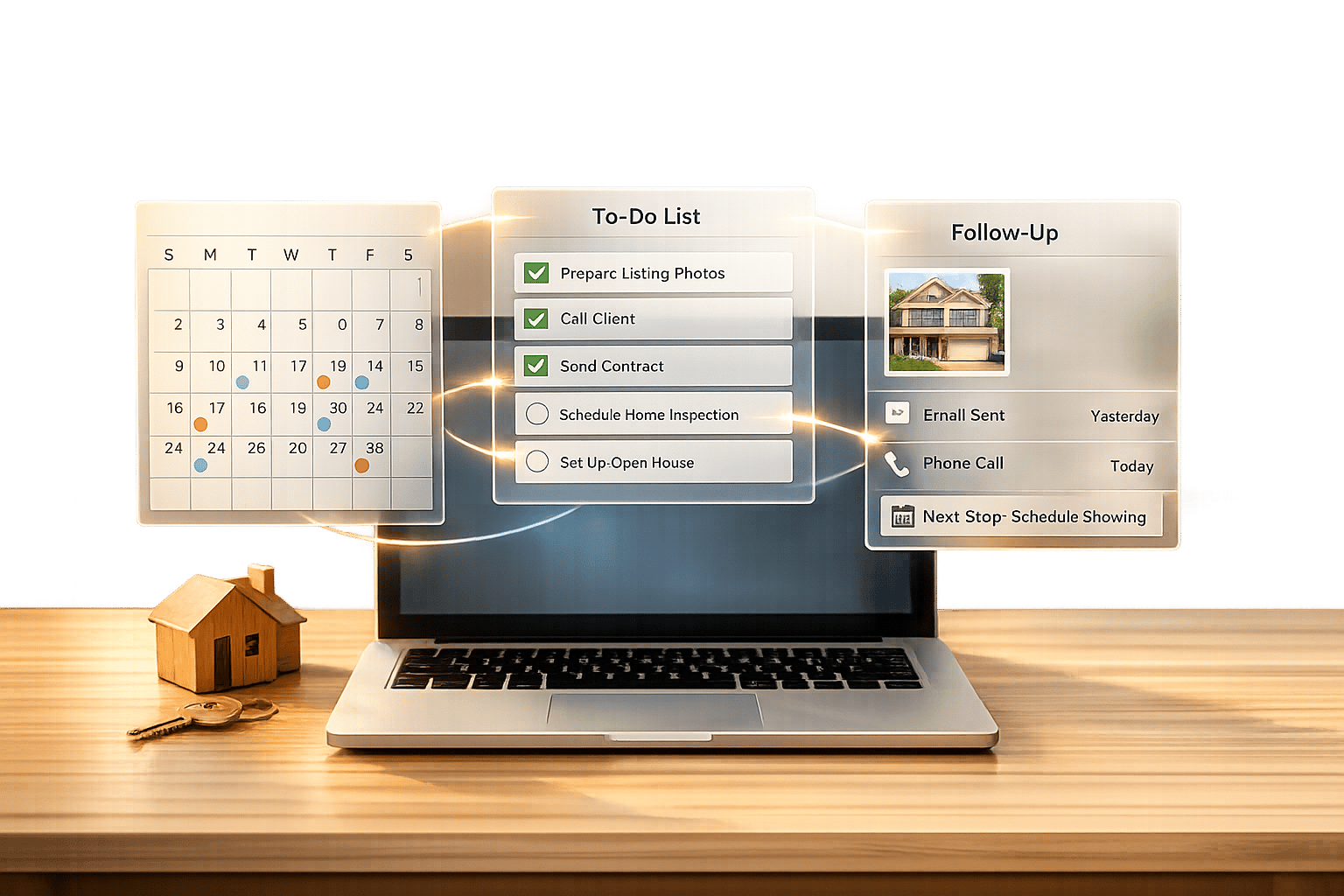
Managing real estate tasks without a centralized system leads to chaos. Integrating your CRM with tools like calendars, email, and property portals can save time, improve team collaboration, and boost revenue. Here's why CRM integration matters and how it works:
- Centralized Task Management: Keep all client details, deadlines, and schedules in one place for easy access and organization.
- Automation Benefits: Automate repetitive tasks like follow-ups, scheduling, and data entry through real estate workflow automation, freeing up time for client interactions.
- Improved Team Collaboration: Real-time updates ensure everyone stays informed, reducing errors and duplication.
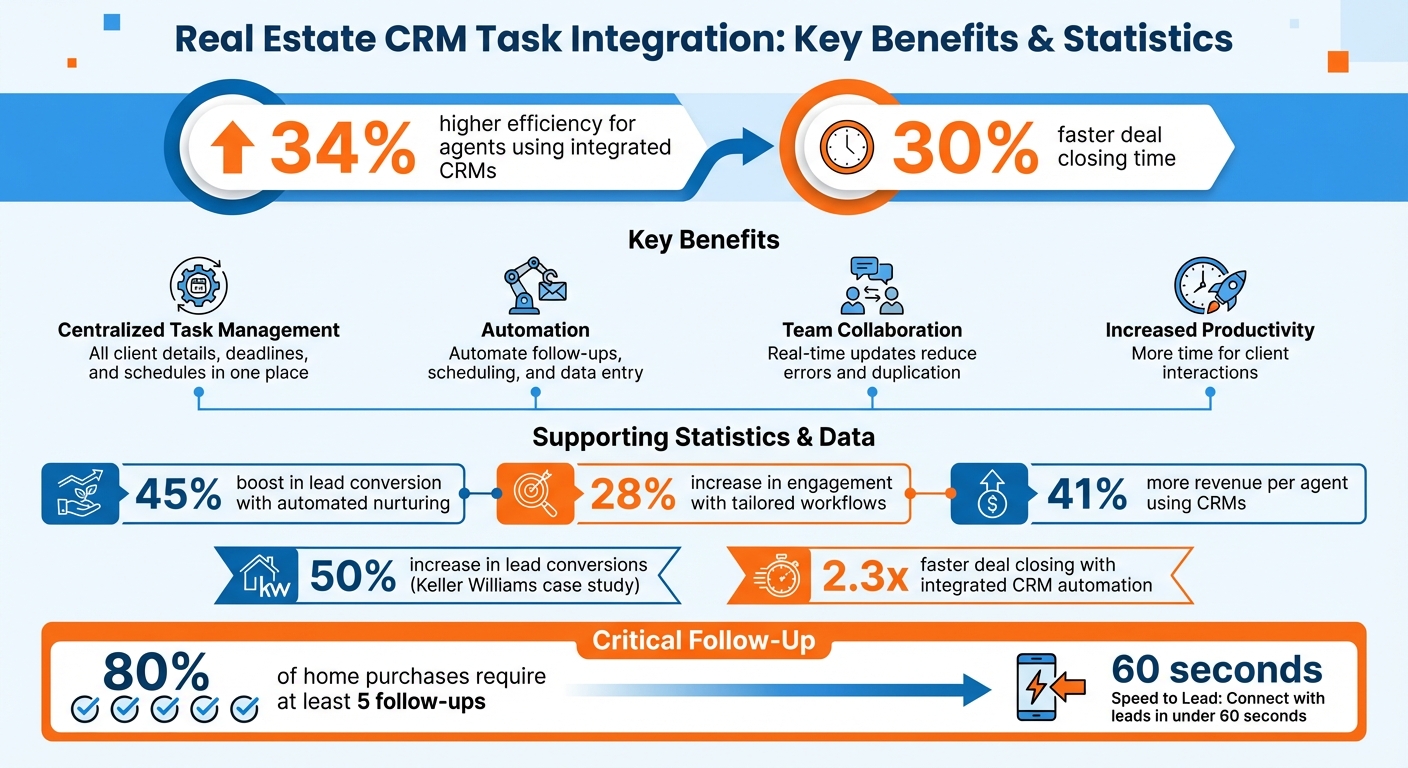
- Increased Productivity: Agents using integrated CRMs see up to 34% higher efficiency and close deals 30% faster.
The process involves migrating data, customizing workflows, and setting up automation for tasks like lead follow-ups, meeting scheduling, and document sharing. Tools like CoreCast simplify this by offering features like automated reporting, task notifications, and a centralized dashboard.
Real Estate CRM Task Integration Benefits and Statistics
Creating a Zapier Integration Made Simple: Integrating a Real Estate CRM with HighLevel
sbb-itb-99d029f
Benefits of CRM Task Integration for Real Estate Professionals
CRM task integration offers a wealth of advantages for real estate professionals, simplifying processes and enhancing productivity.
Centralized Task Management
Keeping tasks, deadlines, and client details in one place saves agents from juggling multiple tools like email, spreadsheets, or sticky notes. With centralized task control, everything from scheduling showings to following up on leads is managed in a single hub [4][2]. Each task directly connects to client records, so when you pull up a client profile, you instantly access their property preferences, past interactions, and upcoming appointments [5][3]. No more wasting time hunting for scattered information.
Cloud-based CRMs ensure updates sync across all devices in real time. For example, an agent can update a task on their phone during a property visit, and the office team sees the change immediately [4][3]. Many brokerages integrate their CRMs with over 200 lead sources, enabling automatic task creation when prospects fill out forms or request details. This eliminates manual data entry and ensures no lead gets overlooked [3].
Better Collaboration and Transparency
Real-time access to shared data transforms team collaboration. Managers can easily track portfolio performance and workloads, identify bottlenecks, and reassign tasks based on availability and expertise [5][4]. When everyone has access to the same client notes, schedules, and deal updates, miscommunications disappear. No more duplicate calls to a lead or missed appointments because someone wasn’t informed [6].
Task assignments come with visible deadlines and priority levels, fostering accountability within the team [5][4]. Integrating tools like Slack provides instant notifications when deals progress or new listings become available [2][6]. This keeps field agents and office staff aligned without constant check-ins, making remote collaboration seamless and efficient. These improvements in teamwork lay the groundwork for automation to further boost productivity.
Increased Productivity Through Automation
Automation takes efficiency to another level by handling repetitive tasks like data entry, document management, and follow-up emails [2]. Standardized workflows guide agents through every stage of a transaction with automated checklists, ensuring nothing is missed during complex deals [1][3]. For instance, if a lead visits a property multiple times, the CRM can automatically send them a personalized email with similar listings, providing timely responses without manual effort [7].
"Top agents view automation not as a shortcut, but as a strategic tool to focus on high-value activities." - Tom Ferry, Real Estate Coach and Author [7]
Agents who implement automated lead nurturing workflows see up to a 45% boost in lead conversion [7]. Calendar syncing eliminates the hassle of scheduling by showing availability and sending meeting confirmations automatically [2][3]. Setting up workflows tailored to specific client types can also enhance engagement by as much as 28% [7]. The time saved from these automated processes allows agents to focus on what matters most: building relationships and closing deals.
How to Set Up CRM Task Integration
Setting up CRM task integration involves three key steps: migrating your data, aligning workflows with your business needs, and automating repetitive processes for efficiency.
Data Migration and Setup
Start by securely connecting your existing data sources to the CRM. Use secure API keys or OAuth to ensure your data is protected. Identify key data categories - such as contacts, leads, notes, tags, and deal records - and make sure tasks are properly linked to property records by using multiple identifiers like UUIDs, MLS numbers, or street addresses.
Before importing data, standardize your task checklists for each pipeline stage (e.g., leads, listings, buyers, and closings) to ensure they align with your automated workflows. To avoid duplicate entries, standardize addresses by, for example, converting "St." to "Street" and removing unit numbers. Begin with an initial bulk sync to bring over existing data, then switch to real-time event monitoring to keep everything up to date. Once your data is successfully migrated, fine-tune the processes to fit your specific business operations.
Customizing Workflows and Pipelines
With your data securely in place, the next step is to define lead sources and assign responsibilities within the CRM. A standard real estate pipeline might include stages like New Lead, Contacted, Qualified, Follow-Up, Offer Made, Under Contract, and Closed. Keeping these stages straightforward helps reduce confusion and delays.
Create task templates for recurring activities such as property showings, follow-ups, and key transaction milestones. These templates ensure consistent service and help agents stay on top of critical tasks. To streamline the process further, configure the CRM to automatically attach essential documents at specific deal stages.
"Today the challenge for agents is conversion. The only way to convert is to engage with the prospect. With so many leads coming from so many places, finding a system that meets the needs of today's agent is daunting."
– Bruce Ailion, Owner, The Ailion Team
Configuring Automation and Calendar Sync
To integrate your CRM tasks with external calendars, use iCal/ICS feed URLs for platforms like Google, Apple, or Outlook. Set refresh intervals (e.g., every 15 minutes) to keep updates timely. Save time on scheduling by setting recurring availability and using booking links to automatically update calendars and task lists.
Leverage if-then triggers to automate actions based on client behavior. For example, when a lead visits a property listing multiple times, set up an automatic follow-up task. Use webhooks to register HTTPS endpoints, enabling real-time notifications for external events like showings or new offers. To stay on top of critical transaction tasks, enable email or mobile push notifications to trigger at specific intervals, such as 24 hours before a deadline. This setup ensures that your CRM remains a centralized, efficient hub for managing tasks and schedules.
Real Estate Task Automation Use Cases
With CRM task integration, you can automate everyday real estate processes and save valuable time. In fact, integrated CRM automation has enabled real estate investors to close deals 2.3 times faster [8]. Let’s look at how these tools simplify lead management, meeting scheduling, and recurring tasks.
Automating Lead Follow-Up
Quick follow-up is critical in real estate. Did you know that 80% of home purchases require at least five follow-ups [10]? CRM automation makes this easier by sending instant welcome emails or SMS messages as soon as a lead submits a form or clicks on a listing. These systems can even implement "Speed to Lead" protocols, connecting agents with interested buyers or sellers in under 60 seconds [8].
Drip campaigns are another powerful tool. For example:
- Day 1: Send an introductory video and neighborhood guide.
- Day 3: Share a curated property list based on the lead’s search criteria.
- Day 7: Follow up with an offer to schedule a showing [7].
Behavior-based triggers take it a step further. If a lead views a specific listing three times or clicks on a property tour link, the system can automatically create a high-priority follow-up task [7].
Automated lead scoring also helps by identifying "Hot" prospects based on actions like email opens, site visits, and property views. Keller Williams Realty, for instance, boosted lead conversions by up to 50% after refining their CRM automation and follow-up strategies [10].
Streamlining Meeting Scheduling and Document Sharing
Coordinating showings, appraisals, and client meetings often involves endless back-and-forth emails. CRM task integration eliminates this hassle by embedding booking links into automated emails or your email signature. Clients can pick a time directly from your synced calendar, and the system automatically creates tasks, sends confirmations, and updates your Google Calendar [2]. This keeps everyone on the same page and helps avoid scheduling conflicts.
When a deal reaches a key stage - like "Under Contract" - the CRM can automatically attach essential documents, such as purchase agreements or tax bills, to the task list [2][8]. Integrations with cloud storage platforms like Google Drive or OneDrive make it easy to share inspection reports or market analysis documents during meetings. This creates a centralized repository for all transaction-related materials, ensuring everyone involved has access to the right information [2].
Managing Recurring Tasks and Property Inspections
Recurring tasks like property inspections, maintenance checks, and client reviews can easily slip through the cracks without a system in place. CRMs with "Recurring" task features can schedule these activities at regular intervals - weekly for active listings, monthly for property management, or annually for client anniversary check-ins [11].
For transaction workflows, automated checklists can be a game-changer. For instance:
- When a property enters the "Active Listing" stage, the CRM can generate tasks for staging, professional photography, MLS submission, and social media promotion [2][9].
- As the deal progresses to "Under Contract", new tasks for final inspections, appraisals, and document filing are automatically added.
This level of automation reduces errors, ensures regulatory compliance, and keeps everything running smoothly [1][2]. By handling these repetitive tasks automatically, agents can focus on building relationships and closing deals while maintaining consistent service quality.
Best Practices for CRM Task Integration
Making the most of CRM task integration often comes down to consistent fine-tuning. Real estate professionals who regularly review their processes and make small adjustments can see noticeable improvements in lead conversion rates [7].
Reviewing and Refining Workflows
To keep your workflows running smoothly, they need regular attention. Check key metrics like email open rates, click-through rates, and task completion times on a weekly or monthly basis. These reviews help pinpoint where deals stall in your pipeline and highlight areas for improvement. On average, such consistent evaluations can boost engagement by 28% [7].
"Consistency is key. Agents who schedule regular reviews of their workflows and make small adjustments end up with highly relevant sequences that drive engagement." - Greg Harrelson, Real Estate Broker [7]
A/B testing can be a game-changer here. Test small adjustments to your workflow content, timing, or frequency to determine what resonates most with your audience. For instance, tailoring workflows to specific groups - like first-time buyers versus seasoned investors - has been shown to increase engagement by up to 28% [7]. While automation handles routine tasks, don't overlook the importance of personal touches. Key moments like birthdays, anniversaries, or closing dates should always receive a personal touch to strengthen client relationships.
Once workflows are optimized, the next step is to delegate tasks efficiently.
Task Delegation Strategies
Delegating routine tasks allows you to focus on high-value activities. Role-based assignments can help, such as routing high-value leads (properties over $500,000) to senior agents while administrative tasks go to support staff.
| Task Category | Suitable for Delegation/Automation | Not Suitable (Requires Personal Touch) |
|---|---|---|
| Administrative | Data entry, filing documents, and building client databases. | Final negotiations and signing purchase agreements. |
| Communication | Initial welcome emails, open house invites, and property list sharing. | Responding to specific client questions and milestone outreach (birthdays/anniversaries). |
| Scheduling | Setting up routine meetings, appraisals, and walkthroughs via automated schedulers. | Building rapport during initial walkthroughs and "authentic human moments." |
| Marketing | Social media updates, newsletter distribution, and remarketing campaigns. | Personalized video introductions and one-on-one follow-ups for high-intent leads. |
| Reporting | Generating monthly budgets and comparative market analysis reports. | Strategic decision-making based on report insights. |
Centralized visibility is crucial. When everyone on your team - agents, marketers, and admins - has access to the same real-time data, you avoid duplicate efforts and missed opportunities. Teams using integrated CRM systems report a 34% increase in management productivity [6].
With tasks delegated effectively, the focus shifts to monitoring performance metrics.
Monitoring Metrics and Team Performance
To improve, you need to measure. Start by tracking lead conversion rates to see how well your automated nurturing efforts move prospects toward closing. Keep a close eye on speed to lead - a delay of even 24 hours can result in lost opportunities [12].
Other key metrics to monitor include stage-to-stage conversion rates (to identify where leads drop off), average time to close, and revenue per agent. Real estate teams using CRMs have reported up to 41% more revenue per agent [6], and integrated systems help close deals 30% faster [6].
Standardizing your pipeline stages across the team is equally important. When everyone uses consistent terms like "Qualified" or "Offer Submitted", your reports remain accurate and actionable. Set up real-time alerts to monitor API health and integration performance - small changes, like a listing platform updating a field name, can disrupt automated syncing and lead to missed opportunities. Finally, keep your CRM data clean by removing duplicates and standardizing contact fields. A well-maintained CRM serves as a reliable "single source of truth" for your entire team [6][13].
How CoreCast Supports Real Estate CRM Task Integration
CoreCast simplifies task management by combining property data, financials, client communications, and deal tracking into one unified platform. Forget the hassle of switching between underwriting tools, pipeline managers, and reporting software. With CoreCast, everything you need is available in a single dashboard, eliminating data silos that slow down productivity.
At the heart of CoreCast's task integration is the Pipeline Tracker, a tool designed to provide complete visibility into deal progress. Using a drag-and-drop Kanban layout, it tracks deals from initial pursuit to final disposition. There's also an integrated map view that highlights geographic clustering and competitive landscapes, all without the need to toggle between apps. CoreCast’s smart alerts and automated task creation ensure you never miss a deadline, seamlessly fitting into your existing workflows. Plus, the platform keeps a full audit trail of deal progression through its historical logs.
Here’s a breakdown of CoreCast's standout features:
| CoreCast Feature | Functionality | Workflow Benefit |
|---|---|---|
| Pipeline Tracker | Real-time updates with Kanban/Map views | Enhances visibility and prevents deal slippage |
| Automated Reporting | One-click branded updates and calculations | Cuts manual reporting time by 50% |
| AI Agent Integration | Automated data fetching and storage | Removes the need for manual data entry |
| Stakeholder Portal | Secure, tailored data sharing | Simplifies investor relations and approvals |
| Smart Alerts | Task creation and notifications | Ensures follow-ups and deadlines are met |
CoreCast also offers portfolio analysis tools that deliver insights into property holdings through performance metrics, asset comparisons, and historical market trends. These tools work hand-in-hand with its task management and automation features, ensuring every stage of the deal pipeline is backed by actionable data. Whether you're managing office spaces, retail properties, multifamily units, or industrial assets, CoreCast supports all major commercial real estate asset classes.
When it’s time to communicate with investment committees or partners, the stakeholder portal streamlines the process with secure data sharing and automated waterfall calculations. This eliminates the need for endless email threads, keeping everyone aligned and informed.
Designed to complement - not replace - your existing CRM and property management tools, CoreCast ensures seamless integration with third-party software while maintaining a centralized system for your operations. Pricing starts at $50 per user per month (beta), with additional tiers at $75 (Essentials) and $100 (Pro), making high-level intelligence accessible for teams of all sizes.
Conclusion
Bringing task management into your CRM can completely change the way you manage real estate operations. Instead of juggling leads, showings, and deadlines across various tools, a centralized system keeps everything organized in one place. This eliminates the constant back-and-forth between apps and lowers the chances of missed follow-ups or duplicated efforts.
This integration boosts productivity, increases revenue, and speeds up processes overall. These benefits make upgrading your CRM integration a no-brainer if you want to stay ahead in the game.
Automation takes care of repetitive tasks, freeing you to focus on what matters most: building client relationships and closing deals. This shift allows agents to dedicate more time to meaningful interactions that drive conversions.
Take a close look at your current tools to identify and resolve issues like data loss or duplication. Plan which integrations will make the biggest difference - whether that’s syncing your calendar to avoid double bookings, automating lead follow-ups, or linking your email marketing platform. Always test new workflows in a controlled setting before rolling them out to your team.
Integrating tasks with your CRM isn’t just about working faster - it’s about working smarter. With real-time pipeline tracking, automated deadline reminders, and smoother team collaboration, you’ll spend less time on admin work and more time serving clients and growing your business. Start refining your integrations now to set the stage for a more efficient future.
FAQs
Which CRM integrations should I set up first?
Start by focusing on integrations that simplify your essential workflows and enhance data accuracy. Begin with linking your CRM to property management systems, lead capture tools, and communication platforms. This reduces manual work and keeps client and property data current.
You can also connect your email and calendar tools, such as Gmail or Outlook, to enable automated reminders and effortless scheduling. This not only saves time but also boosts teamwork. These initial integrations lay the groundwork for a smoother and more efficient workflow.
How do I avoid duplicate contacts and tasks during migration?
Before migrating, take steps to prevent duplicate contacts and tasks by cleaning and organizing your data. Start by auditing your records to eliminate duplicates and outdated entries. Then, use the deduplication or merge tools available in your CRM to consolidate similar data.
Next, carefully map the fields from your source system to the corresponding fields in your target CRM. This helps avoid mismatches or misplaced data during the transfer. To ensure everything runs smoothly, test the import process with a small batch of data first. This way, you can catch and fix any issues before moving all your records.
What tasks should I automate vs keep personal?
Automating repetitive tasks such as follow-up emails, scheduling, data entry, and pipeline management can be a game-changer. These processes take up valuable time and are prone to human error, but automation handles them efficiently. This way, you can focus your energy on tasks that matter more.
However, when it comes to activities that require emotional intelligence or nuanced decision-making - like handling complex negotiations, offering tailored consultations, or managing sensitive communications - it's best to keep them manual. These interactions rely on trust, empathy, and a personal connection, which automation simply can't replicate.