
How Notification Workflows Improve Deal Tracking
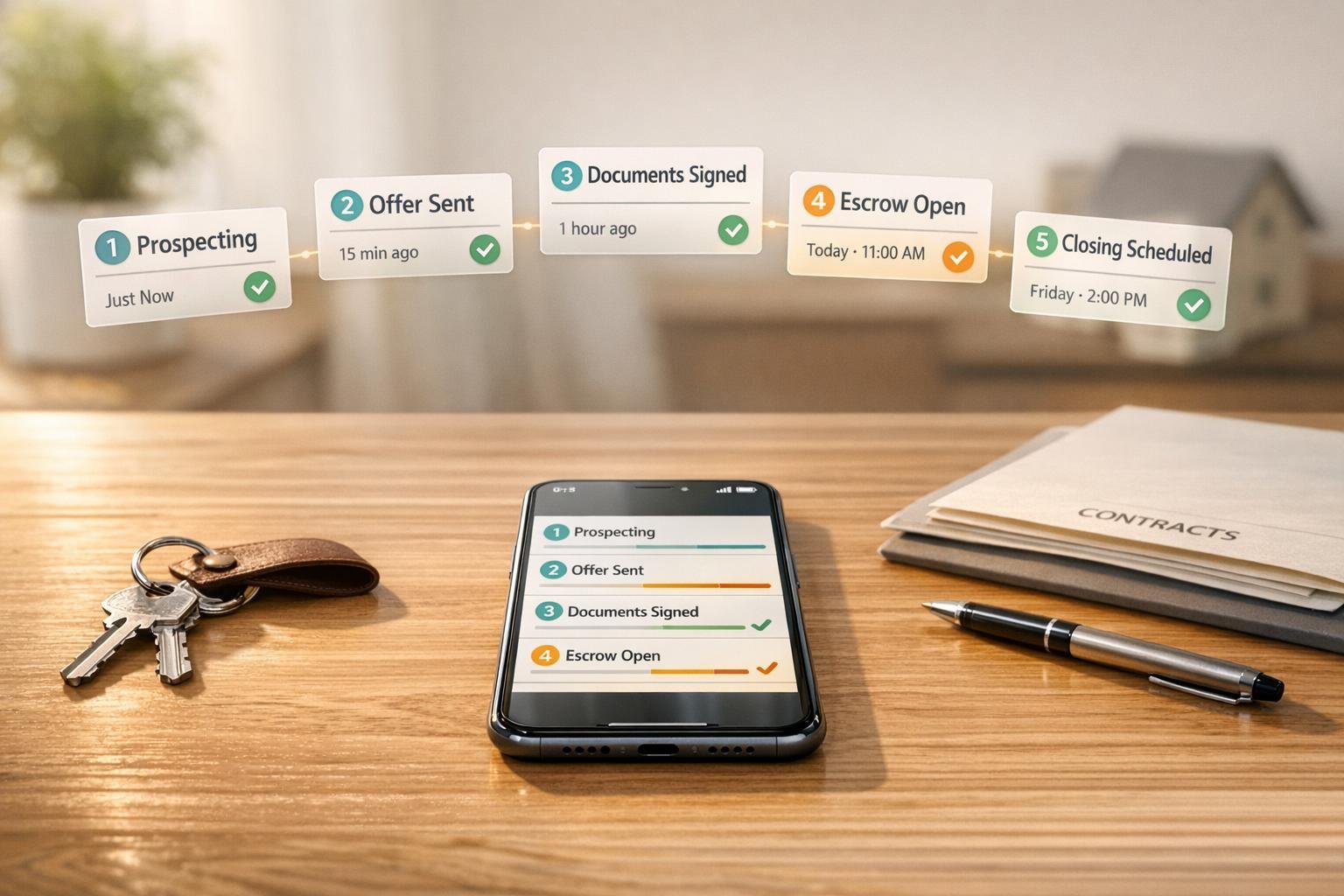
Real estate deals often fall through due to missed deadlines, poor communication, and outdated processes. Automating notifications can help solve these issues by keeping all stakeholders informed in real time and reducing errors. Here's how automated workflows improve deal pipeline tracking:
- Timely Alerts: Notify the right people about critical milestones (e.g., contract signed, deadlines approaching) to avoid delays.
- Improved Communication: Ensure updates are shared across teams, reducing email clutter and fragmented communication.
- Real-Time Visibility: Provide up-to-date insights into deal progress, enabling quicker decisions and interventions.
- Fewer Errors: Automate data entry and compliance tracking to minimize mistakes and liability risks.
Platforms like CoreCast integrate these workflows into tools you already use, simplifying processes and improving outcomes for your deals. By automating notifications, you can focus on closing deals instead of chasing updates.
Common Deal Tracking Problems in Real Estate
Real Estate Deal Tracking Statistics: Manual vs Automated Workflows
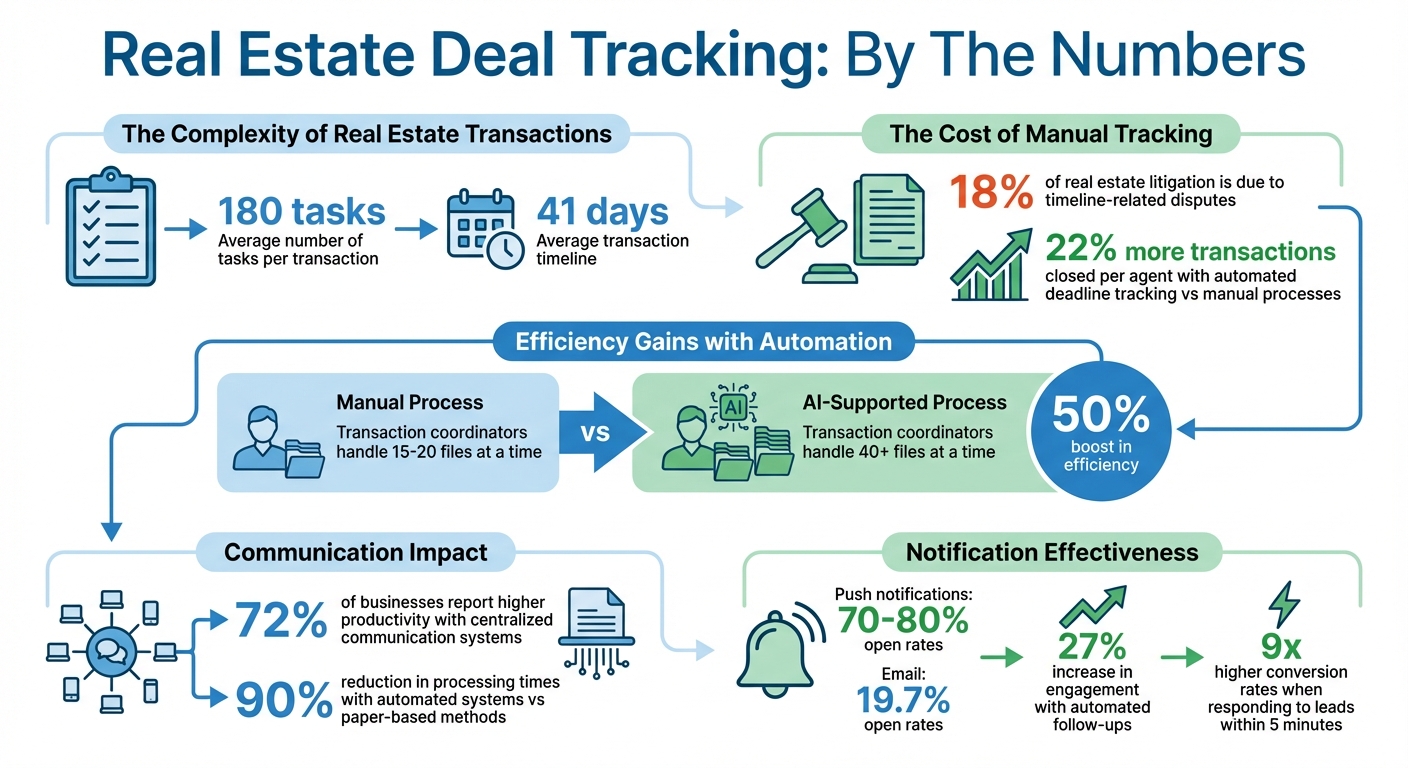
Tracking real estate deals with spreadsheets, emails, and static checklists is a common practice, but it’s far from efficient. Transactions often require managing an average of 180 tasks over 41 days[5]. With so many moving parts, it’s easy for things to fall through the cracks.
Missed Deadlines and Milestones
Missing a single deadline can create a ripple effect, potentially derailing an entire chain of closings. In fact, timeline-related disputes are responsible for nearly 18% of real estate litigation[6]. Brokerages also face higher Errors and Omissions (E&O) liability when deadlines are overlooked due to manual tracking.
"One missed date, the earnest-money deadline expires, and a chain of closings collapses. You shouldn't have to live in your inbox to keep deals alive." – Datagrid Team[6]
Relying on manual methods, like calendars or spreadsheets, to track business days increases the chance of missing critical dates, such as inspection windows or earnest money deadlines. This isn’t just stressful - it’s costly. Teams that use automated deadline tracking systems close 22% more transactions per agent compared to those sticking with manual processes[6]. The takeaway? Automating tasks doesn’t mean working harder; it means working smarter. Using a real estate deal analysis tool alongside automation ensures every opportunity is vetted for maximum profitability.
Disconnected Communication Among Stakeholders
In real estate, coordinating lenders, attorneys, brokers, and clients often happens through email. But with each stakeholder managing their own inbox, communication becomes fragmented[4][3]. Important updates can get buried, and key questions might go unanswered. This lack of cohesion slows deals down and increases the risk of missing unique requirements, especially for properties like condos, farmland, or multi-family units[5]. Static checklists simply can’t account for the nuances of every transaction.
No Real-Time Visibility
Without real-time updates, leadership teams are left relying on outdated snapshots of deal progress. This lack of visibility often forces teams to spend hours piecing together information during status meetings[3]. By the time issues like appraisal delays or financing problems are identified, they’ve often escalated into bigger problems.
Human Errors in Data Updates
Manual data entry is prone to mistakes. Whether it’s typos or transposed numbers, these small errors can lead to compliance headaches and reporting issues. Transaction coordinators managing files manually typically handle 15–20 files at a time, while those supported by AI can manage over 40 files[5]. That’s a 50% boost in efficiency. On top of that, automated tools with contract-reading capabilities and audit trails make it easier for firms to prove they’ve met their obligations during disputes[3][5].
These challenges highlight the need for a proactive approach - one that leverages real-time updates and customizable notifications to keep deals on track.
sbb-itb-99d029f
What Are Customizable Notification Workflows?
Customizable notification workflows are systems designed to automate real-time updates based on specific triggers like deal stages, statuses, or custom data. These workflows rely on pre-defined rules to ensure the right people get the right information at the right time. For instance, they can automatically notify teams when underwriting is finalized or when a Letter of Intent (LOI) is signed. You can control who gets notified, when they’re notified, and what details they receive. This proactive system bridges the gap between tracking deals and taking immediate action.
Automated Alerts for Key Milestones
These workflows excel at sending timely alerts for critical milestones. For example, they might notify your acquisitions team as soon as underwriting is complete or remind project managers 30 days before construction begins to ensure resources are ready. Alerts are fine-tuned to highlight high-priority events - like when a deal reaches "Contract Sent" or "Closed Won" stages - so your team stays informed without being overwhelmed by unnecessary notifications. This approach minimizes alert fatigue while keeping everyone focused on what matters most.
Stakeholder-Specific Updates
With these workflows, updates are tailored to each stakeholder’s role and needs. Notifications can be filtered by criteria such as role, deal size, asset type, or location. For example, senior management might only receive alerts for high-value deals, while associates get detailed updates on every property in their portfolio. This targeted system ensures fewer distractions and delivers more relevant, actionable information to each team member.
Integration with Dashboards and Tools
Customizable workflows go beyond simple alerts by integrating seamlessly into your existing tools and dashboards. Whether it’s CoreCast or third-party platforms like Slack, Microsoft Teams, QuickBooks, or Buildium, these workflows ensure updates are shared across your entire tech stack. When a deal’s status changes, the system triggers notifications automatically, eliminating the need for manual data entry across multiple platforms. This creates a streamlined, interconnected system where information flows effortlessly, saving both time and effort.
How Notification Workflows Solve Deal Tracking Problems
Notification workflows streamline deal tracking by automating processes, improving communication, ensuring visibility, and enhancing data accuracy. These workflows guide deals through predefined pipeline stages while ensuring alerts reach the appropriate team members. As Matt Carrigan from Dealpath explains:
"Instead of emailing, or even commenting, you can simply push deals through workflows based on your pipeline processes, with confidence that the alert will reach the right team member." [2]
Better Communication and Collaboration
Notification workflows address the communication gaps that often arise during deal tracking. By automating workflows, manual handoffs between departments are eliminated. For example, once underwriting is completed, the system can instantly notify the acquisitions associate. Similarly, when a deal closes, accounting is promptly alerted for reconciliation. This reduces the need for frequent update meetings and ensures smooth transitions between teams.
Accountability and issue escalation are also built into these systems. If a milestone is delayed, project owners are automatically notified to address the problem. Stakeholder-specific alerts ensure that key players - like CIOs, fund managers, or legal teams - are only contacted when deals meet their specific criteria, such as reaching a certain dollar amount or entering a high-priority category. For even greater efficiency, notifications can integrate with tools like Slack, Microsoft Teams, or Jira, enabling real-time communication and quick action.
Real-Time Deal Progress Visibility
Real-time notifications transform raw data into actionable insights. Instead of relying on manual dashboard checks, team members are instantly alerted to critical updates - such as a contract being reviewed or a closing date being rescheduled. These notifications empower stakeholders to adjust capital deployment plans and reallocate resources as needed.
The system also flags inactive deals that have been stagnant for five or more days, allowing teams to intervene before opportunities are lost. As MarketBetter notes:
"The deals you save are the ones you see in time. See them in Slack, where you're already looking." [9]
Each alert includes direct links to take immediate action, whether it’s calling a contact, drafting an email, or reviewing the full deal timeline. This ensures that notifications aren’t just informative but also actionable.
Enhanced Accuracy and Compliance
By automating data entry and task tracking, these workflows significantly reduce the risk of human error. They incorporate features like blocker detection, which flags incomplete tasks or failed validations, ensuring that deals don’t move forward until all compliance steps are completed. Role-specific alerts keep compliance officers informed about missing documents or deals entering sensitive stages.
Additionally, the system creates an unchangeable audit trail that records all milestone changes, document uploads, and approvals. This is invaluable for reviews conducted by brokers, regulators, and clients. Proactive deadline management features - such as notifications sent 30 days before critical dates like construction starts or closing deadlines - help teams stay organized and allocate resources effectively. Color-coded visual cues also make it easy to see which tasks are completed, pending, or overdue, further supporting compliance efforts.
Next, we’ll look at how these advantages are incorporated into CoreCast’s advanced notification workflow features.
CoreCast's Notification Workflow Features
CoreCast tackles the challenges of manual updates and scattered communication head-on by providing a streamlined solution for deal tracking. By consolidating tools into a central source of truth, real estate professionals can manage their workflows with greater efficiency and accuracy. These features are designed to address the real-time tracking and communication needs highlighted earlier.
Pipeline Tracking Through Deal Stages
CoreCast offers a centralized pipeline tracker that simplifies the process of logging opportunities and tracking their progress. From acquisitions to operations, the platform keeps everything organized in one place [10]. As deals move through stages like underwriting, due diligence, financing, closing, and asset management, the system automatically updates their status and notifies the relevant team members. It even creates tasks and sends reminders, ensuring everyone stays on top of their responsibilities [1][10]. When a deal progresses, CoreCast seamlessly assigns tasks to the appropriate individuals, keeping the entire team aligned.
Stakeholder Center for Custom Alerts
CoreCast enhances communication by tailoring alerts to specific stakeholders. This feature allows users to customize notifications based on roles and deal attributes, ensuring that each person receives updates relevant to their responsibilities. By filtering out unnecessary information, CoreCast reduces notification overload while maintaining accountability [1][10]. Stakeholders see only what they need to, helping them stay focused and informed without being overwhelmed.
Integrated Reports and Insights
CoreCast's reporting tools turn deal data into actionable insights. The platform generates reports for key stakeholders and integrates with systems like Buildium, QuickBooks, and RealPage [1]. This ensures that everyone has access to the latest deal data alongside scenario-based insights. Additionally, its scenario modeling tools allow users to simulate variables like financing terms and expense projections, with real-time updates reflecting any changes [1][10]. These features provide a comprehensive view of deals, enabling smarter decision-making.
Benefits of Using Notification Workflows in Real Estate
Notification workflows are transforming how real estate professionals handle transactions by removing bottlenecks and ensuring everyone stays on the same page. These systems simplify processes and improve outcomes for deals.
Higher Productivity and Efficiency
Automated notifications can save hours of administrative work by cutting out manual tasks like sending emails or scheduling meetings. This shift allows professionals to focus on building relationships and making strategic decisions [11].
These workflows ensure team members are alerted exactly when their input is needed - like when underwriting is completed - helping avoid unnecessary delays [2]. In fact, 72% of businesses report higher productivity when communication is streamlined through a centralized system [11].
"If you alert on every single deal stage change, your team will start ignoring them. Decide which stages need alerts... and who needs to see each alert." - Everyday RevOps [7]
To make the most of these systems, it's smart to configure alerts for major milestones such as "Contract Sent" or "Closed Won" instead of every minor update [7]. Multi-channel notifications - whether in-app, email, SMS, or Slack - can ensure stakeholders receive updates where they’re most likely to see them [2][3]. Setting reminders for key dates, like 30 days before a construction start, also gives teams the chance to adjust resources ahead of time [2].
This streamlined communication process helps deals close faster and keeps everything moving smoothly.
Faster Deal Closures
Automated systems significantly speed up transaction processes - cutting processing times by as much as 90% compared to manual, paper-based methods [12]. Stakeholders receive instant updates as milestones are reached, keeping everyone informed and reducing delays [2].
Push notifications, which boast open rates of 70–80%, far outperform email open rates of 19.7% [13][14]. Automated follow-ups further increase engagement by 27%. By bypassing crowded inboxes, these alerts allow professionals to respond to opportunities faster. For example, responding to a lead within five minutes can increase conversion rates by up to nine times [8].
Quick responses not only speed up deal closings but also help maintain accountability across teams.
Better Accountability and Alignment
Notification workflows enhance transparency by clearly defining responsibilities, ensuring no task is overlooked. Custom alerts - tailored by deal size, asset type, or stakeholder - help senior management stay informed about high-priority opportunities without being overwhelmed by unnecessary updates [2].
These workflows also flag upcoming deadlines and potential blockers before they become major issues [3]. By addressing common challenges like missed deadlines and human error, automated alerts create an audit trail that reduces compliance risks and minimizes mistakes tied to manual data entry [11][12]. This level of visibility keeps teams aligned and ensures everyone is working toward the same goals throughout the deal lifecycle.
Conclusion
Dealing with challenges like missed deadlines, communication breakdowns, and human error can be a real headache in real estate. But customizable notification workflows are changing the game for deal tracking. These systems automate alerts, keep everyone in the loop in real time, and cut down on manual delays.
Imagine getting an automated update exactly when you need it - whether it’s right after underwriting is done or 30 days before a key milestone. That kind of precise timing helps teams act quickly, avoid costly setbacks, and stay aligned. It’s all about bridging communication gaps and minimizing errors to keep things running smoothly.
CoreCast’s integrated intelligence platform takes these strategies a step further. It combines pipeline tracking, a stakeholder center, and reporting tools into one seamless system. Whether you're managing multifamily acquisitions or monitoring industrial developments, the platform adapts to fit your specific deal criteria and supports a variety of asset classes.
As James Gueits, Principal at MHP Operator, put it:
"Our family office needed a solution to manage legacy real estate assets. They have been instrumental in streamlining our valuation and underwriting processes." [1]
Ready to see how customizable notification workflows can upgrade your deal tracking? Check out CoreCast’s features at https://corecastre.com and join the beta to streamline your real estate operations.
FAQs
Which deal milestones should trigger alerts?
Key moments in a deal's progress that should prompt alerts include changes in deal stages, approaching deadlines, approval updates, and the completion of key tasks. These events are clear indicators of progress and can be tracked to send automated notifications, ensuring stakeholders stay informed instantly.
How do I prevent notification overload?
To keep notification overload at bay, focus on a system that highlights only critical updates. Tailor notifications to alert you about high-priority events, such as changes in deal stages or time-sensitive tasks.
You can simplify alerts by using automation tools or workflows to centralize updates in one place. By filtering and prioritizing notifications, your team can concentrate on what’s most important, cutting through the noise and responding more efficiently.
What should an audit trail include for compliance?
An audit trail for compliance serves as a detailed, step-by-step record of critical deal activities. This includes everything from the creation of the deal to participant invitations, document uploads, approvals, and even payments. These records are essential for ensuring transparency and accountability, while also being invaluable during regulatory reviews.