
How to Use Feedback in Real Estate Platform Design

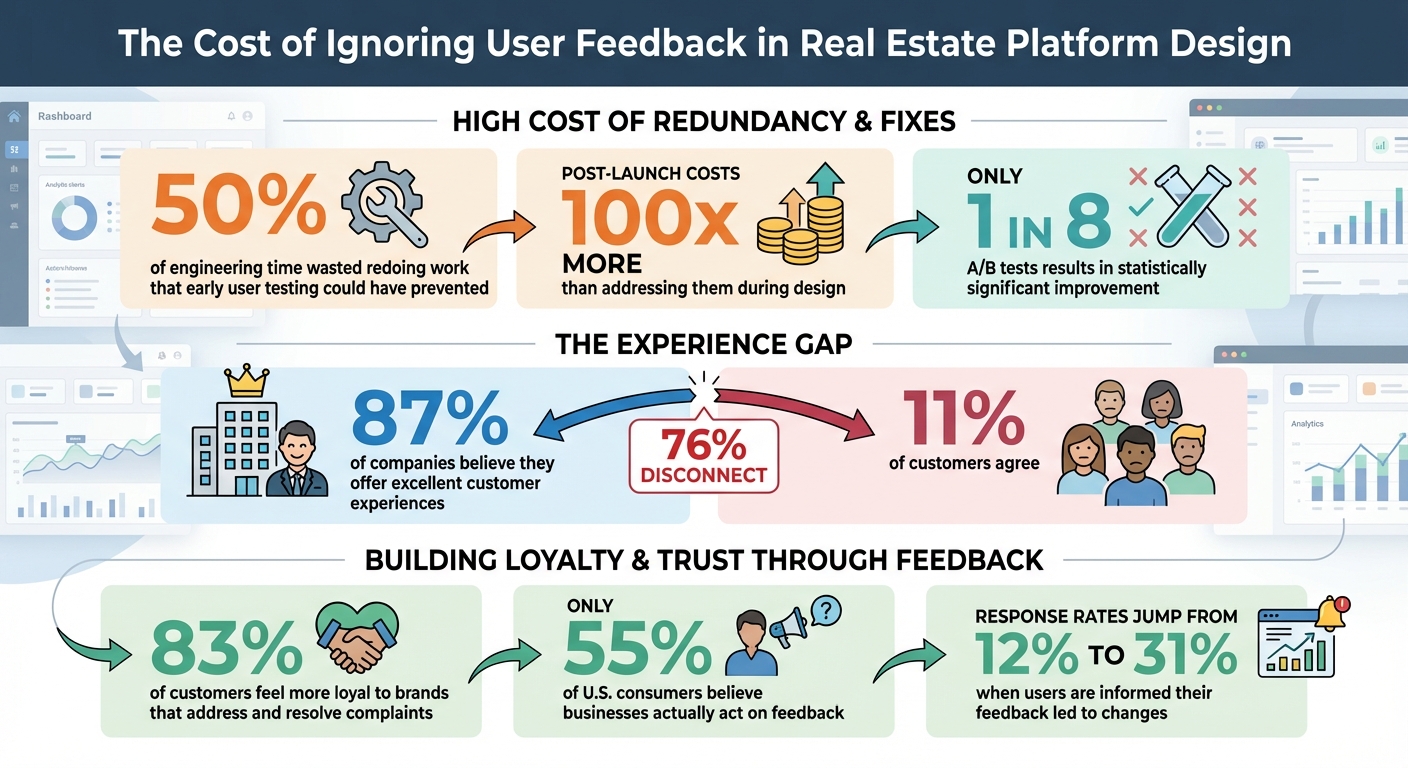
Real estate platforms succeed when they solve user problems effectively. Ignoring feedback can lead to wasted resources - up to 50% of engineering time is spent redoing work that early user testing could have prevented. Fixing issues post-launch can cost up to 100x more than addressing them during design. Platforms like CoreCast show how user feedback can shape features like automation and reporting, keeping tools aligned with user needs.
Key Takeaways:
- Set clear goals: Focus on specific workflows like underwriting or pipeline tracking.
- Use in-app feedback: Gather insights during user interactions for better relevance.
- Prioritize feedback: Act on recurring issues tied to business goals.
- Test and iterate: Use prototypes, beta testing, and A/B testing to refine updates.
- Measure results: Track metrics like NPS, feature adoption, and task efficiency.
- Close the loop: Inform users when their feedback leads to changes to build trust.
User feedback is an ongoing process that ensures platforms evolve effectively, avoiding costly mistakes and improving user experiences.
The Cost of Ignoring User Feedback in Real Estate Platform Design
How to Collect Feedback from Real Estate Platform Users
Set Clear Feedback Goals
Start by pinpointing the exact workflows you want to refine. Instead of asking broad questions about overall satisfaction, focus on areas that matter most to real estate professionals. For example, how efficiently can they complete an underwriting analysis? Does the pipeline tracking align with their deal stages? Are the portfolio analytics delivering the insights they need for investment decisions? When CoreCast launched its Beta version, it specifically sought feedback on its integrated map and stakeholder reporting features.
Define your goals with measurable outcomes tied to these workflows. This ensures you're not overwhelmed by generic comments that don’t lead to meaningful changes. Once your goals are clear, pick feedback methods that capture the necessary details in real time.
Choose the Right Feedback Collection Methods
In-app feedback is often more effective than email surveys because it captures insights while users are actively engaged with your platform [6]. Real estate professionals are busy, and they’re unlikely to interrupt their workflow to respond to an email survey. Instead, use automated in-app prompts triggered by specific user behaviors, like spending extended time on a feature or returning after abandoning a task. These prompts provide context-specific feedback right when it matters most.
"High-quality user research should inspire great designs. It gives us confidence that we're building (and have built) the right things at the right times and in the right way" [6].
- Tira Schwartz, Principal UX Researcher at Redfin
Exit intent prompts - activated when a user moves toward closing the platform - are great for uncovering barriers to conversion. Similarly, in-app surveys triggered during natural pauses, like after completing a deal stage update, can gather detailed and relevant feedback [6]. Once you’ve chosen the right methods, focus on making the process as smooth as possible to encourage participation.
Get More Users to Provide Feedback
Reduce the effort required from users. Keep surveys short - no more than three questions - and use simple, clear language. Avoid complex or double-barreled questions that can confuse respondents. Let users know their feedback drives change to encourage ongoing engagement.
"The less effort required from the user, the more likely it is that they will provide feedback" [6].
- Walter Hannemann, Product Manager at Dualog
Close the feedback loop by updating users when their suggestions lead to improvements [8]. This not only builds trust but also motivates them to share feedback in the future. For instance, if a user suggests better filtering options for the portfolio analysis tool and you implement that feature, send them a quick message to let them know. Testing with a larger group of real estate professionals can also provide diverse insights without delaying your research efforts.
How to Analyze User Feedback
Group Feedback by Topic
Start by organizing user feedback into categories based on user roles and asset classes. For example, investors often focus on portfolio performance and internal rate of return (IRR), while operators are more concerned with property metrics like occupancy rates. Meanwhile, analysts typically need detailed data with advanced filtering and export options. Each group has its own priorities, which can help you uncover specific pain points.
You should also group feedback by asset class. Feedback for Multifamily properties might be completely different from what you hear about Industrial, Office, or Retail properties. Niche categories, like Self-Storage or Cold Storage, often come with their own unique needs [2][3]. Collecting all this feedback in one centralized location ensures you’re capturing insights tailored to each group and sector.
Use Analytics to Understand User Behavior
Once feedback is categorized, dive into the data to understand how users interact with your platform. Combining qualitative feedback with quantitative analytics offers a full picture of user behavior. Tools like heatmaps and usage analytics can help you identify patterns, spot bottlenecks, and flag features that users might be ignoring. For instance, if users are spending an unusually long time on a particular page, it could indicate confusion or a usability issue.
Emerging tools like conversational analytics are also transforming how feedback is analyzed. These tools allow you to query feedback using natural language, such as asking, "What are the most common issues with the Raleigh portfolio?" On top of that, predictive sourcing tools can recommend actions based on user preferences and trends, shifting your focus from simply fixing problems to proactively improving the user experience [2].
Decide Which Feedback to Act On First
Not all feedback is created equal, so it’s crucial to prioritize. Start with feedback that aligns with your platform’s strategy and directly impacts your business goals. Address roadblocks that prevent users from completing critical tasks - like generating reports or finishing underwriting analyses - since these issues often create the most frustration.
Look for recurring themes in the feedback. If several users highlight the same problem, it’s likely affecting a large portion of your audience. Also, consider the importance of the stakeholders providing the feedback. Input from property managers or investors may carry more weight than feedback from casual users. As the industry moves toward ESG metrics and AI-driven automation, prioritize feedback that supports the adoption of these key features.
When implementing updates, consider using progressive disclosure. Start with high-level summaries for executives who need quick insights, but also provide detailed data for analysts who require more depth. This layered approach ensures your updates meet the needs of a wide range of users, guiding your platform’s growth in a meaningful way.
How to Implement Feedback in Platform Updates
Build and Test New Features
Once you've analyzed user feedback, the next step is turning those insights into action. Start by creating low-fidelity prototypes, like mockups or wireframes, to test ideas before diving into full development. Why is this important? Fixing an issue after a product launch can cost up to 100 times more than addressing it during development [11][13]. Early testing saves time, money, and headaches.
Before rolling out updates to your entire user base, test new features internally - a practice often called "dogfooding." This allows your team to identify and resolve major flaws in a controlled, low-risk setting [12]. For more complex updates, consider live user interviews to observe how people interact with prototypes. These sessions often uncover valuable insights that might otherwise go unnoticed [11][13].
Take Autotrader as an example. Their live customer interviews not only validated key design hypotheses but also unearthed new user preferences, shaping their final product [11][13]. This iterative approach ensures you're addressing real user needs.
Release Updates in Stages
Once internal testing is complete, roll out updates gradually. Phased rollouts are a safer way to introduce changes, as they minimize risk and allow you to gather feedback in real-world conditions. Start with a private or public beta program, inviting early adopters to test the new features and provide feedback before a full-scale release [10][12].
This is where A/B testing shines. By comparing two versions of a feature, you can identify what works best. It's worth noting that only one in eight A/B tests results in a statistically significant improvement, underscoring the importance of thorough testing [13]. When done right, these tests can lead to measurable gains and better user experiences [13].
Tell Users About Changes
After refining and deploying updates, keep users in the loop. Clear communication builds trust and strengthens your relationship with your audience. Publish detailed release notes that highlight how user feedback shaped the updates. Whether it’s better portfolio analytics, enhanced map integration, or more efficient reporting, showing users the direct impact of their input encourages continued engagement.
Internally, set up a "feedback river" using real-time tools like Slack or email to share customer insights across teams [9]. This fosters transparency within your organization and ensures everyone understands how user feedback drives platform improvements. Remember, while 87% of companies believe they offer excellent customer experiences, only 11% of customers agree. Bridging this "experience gap" starts with clear, open communication [13].
sbb-itb-99d029f
How to Measure the Results of Feedback-Driven Changes
Monitor Performance Metrics
To gauge how effective your changes are, start by keeping a close eye on key performance metrics. Some of the most useful ones include Net Promoter Score (NPS), Customer Satisfaction (CSAT), Customer Effort Score (CES), feature adoption rates, time-on-task, and conversion rates. Behavioral metrics, like how often users engage with a feature or complete specific actions (e.g., submitting a lead generation form or downloading a report), also offer valuable insights.
For example, tracking feature adoption helps you confirm whether users are engaging with updates as intended. Monitoring "time on task" reveals whether changes are making workflows smoother or causing unexpected friction. Conversion rates, on the other hand, can show if updates are positively impacting key actions like sign-ups or purchases.
It's worth noting that 83% of customers feel more loyal to brands that address and resolve their complaints [14]. Yet, only 55% of U.S. consumers believe businesses act on feedback [15]. This gap underscores why measuring results is so crucial - it demonstrates that you're not just listening but taking meaningful action based on user input.
These metrics provide a foundation for ongoing feedback collection, ensuring that improvements remain user-focused.
Create Ongoing Feedback Channels
One-time surveys won’t cut it if you’re serious about continuous improvement. Instead, build systems that allow for ongoing feedback as your platform evolves. For instance, in-app feedback widgets let users share thoughts without interrupting their workflow [6][1]. Deploy CSAT surveys immediately after users interact with new features to capture their reactions while the experience is still fresh [10][7]. Behavioral triggers can also prompt targeted surveys to gather specific insights [6].
Another effective strategy is integrating tools like Zendesk or Salesforce into a centralized feedback repository. This approach ensures you capture insights from daily user interactions across multiple touchpoints. And don’t forget to close the loop: when you let users know their feedback has led to changes, survey response rates can jump from 12% to as high as 31% [7].
By maintaining these feedback channels, you’ll have a steady stream of insights to guide future updates.
Make Improvements Based on Results
Data isn’t just for tracking - it’s your roadmap for action. Compare metrics from before and after updates to understand their impact. For example, if a new reporting feature has a 40% adoption rate but doubles the time it takes users to complete a report, that’s a clear sign of a usability problem that needs fixing. Segmenting performance data by user type or running A/B tests can also help you fine-tune changes.
And don’t underestimate the value of transparency. When users see that their feedback has directly influenced updates, it strengthens trust and engagement. As Noah Shrader, Product Manager and UX expert at Lightstream, explains:
"User feedback in customer-centric companies is the fuel that drives every internal working part. Every process and every business decision is powered by a deep understanding of who the user is" [6].
The Easiest Way to Collect Customer Feedback (+ Free Template)
Conclusion
Gathering user feedback isn't just a one-time task - it's an ongoing process that forms the backbone of creating real estate platforms that genuinely meet user needs. By consistently collecting, analyzing, and acting on feedback, you move away from guesswork and rely on insights from the professionals who use your platform daily. This proactive approach helps avoid expensive post-launch corrections [11]. Platforms built with user feedback at their core showcase how this strategy can drive success.
Take CoreCast as an example. Developed by industry experts - including analysts, operators, and investors - it was designed to address the inefficient workflows they had personally encountered [2]. CoreCast actively incorporates feedback from Beta users to refine its roadmap and prioritize features that simplify real estate workflows [2][3]. The outcome? A unified platform that replaces disjointed tools with a single, reliable source of truth, enabling continuous improvement and delivering more value to real estate professionals [2][4][5].
FAQs
How can real estate platforms prioritize user feedback effectively?
To design a real estate platform that truly meets user needs, it’s essential to gather feedback directly from the people who will use it. This means conducting interviews, surveys, and workshops to uncover goals and challenges faced by key stakeholders like investors, operators, and analysts. These insights provide a clear picture of what users want and need most.
Once you’ve collected the feedback, the next step is to analyze it. Look for recurring themes and prioritize those that align with your business goals while addressing the most pressing user pain points. For example, improving features like deal pipeline tracking or making dashboards more intuitive can have a significant impact on user satisfaction and platform efficiency.
Tools like CoreCast can make this process easier by consolidating data, enabling real-time analysis, and allowing for customized dashboards tailored to user preferences. By focusing on feedback that improves decision-making, streamlines workflows, and enhances the overall experience, you can strike the right balance between user needs and strategic objectives.
What are the most effective ways to gather user feedback within a real estate platform?
To gather meaningful in-app feedback, it's essential to use tools that are fast, user-friendly, and blend naturally into the platform's workflow. Features like surveys, pop-ups, and feedback widgets can be strategically positioned to prompt users for their thoughts immediately after they engage with specific features or complete tasks. This approach ensures the feedback you receive is both timely and relevant.
For deeper insights, you might want to include annotation tools, bug reporting options, or review prompts. These features allow users to share detailed feedback without disrupting their experience. Keeping these requests brief, unobtrusive, and simple to complete will encourage more users to participate, giving you actionable insights to refine and improve your platform.
Why is it crucial to follow up on user feedback?
Engaging with user feedback is a key part of building trust and demonstrating that their opinions hold value. This approach not only strengthens the bond between users and your platform but also drives meaningful improvements that align with actual user needs.
When you close the feedback loop, users feel acknowledged and appreciated, which boosts their satisfaction and loyalty. Plus, the insights gained from feedback pave the way for smarter updates to your platform - benefiting both your users and your business objectives.